Custom Domain
Your URL, your identity in every link
Logo & Colors
Your visual identity across every screen
6 Languages + RTL
Including full Arabic with RTL layout
Member Profiles
Professional identity for every user
Custom Domain

Your domain in every link, every browser tab.

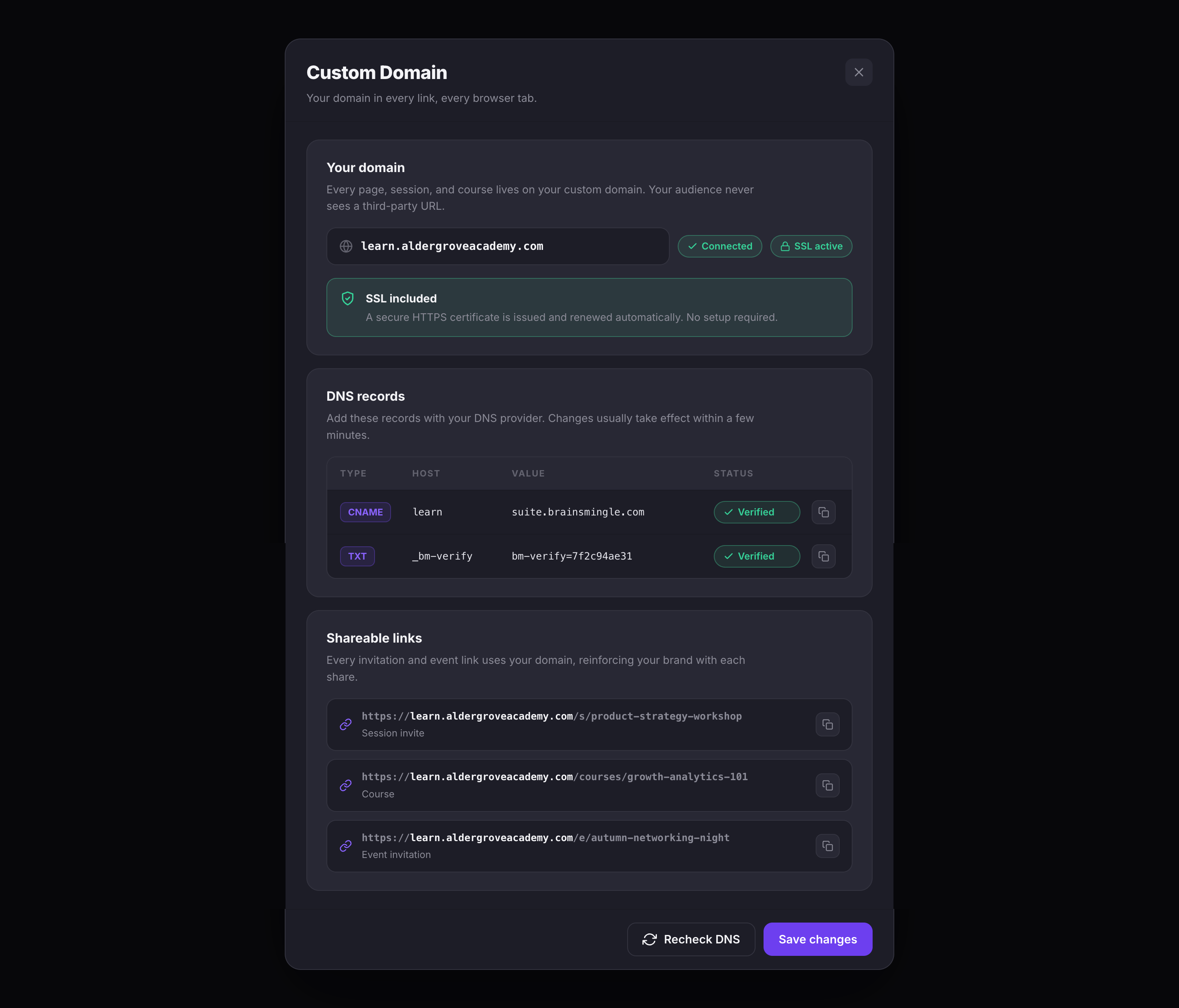
Deploy your Suite on your own domain — learn.yourbrand.com, community.youracademy.org, or whatever fits your organization. Every page, session, and course lives on your domain, so your audience never sees a third-party URL.

  • Your domain — connect a custom domain and every page, session, and course lives on it.
  • SSL included — a secure HTTPS certificate is issued and renewed automatically, with no setup.
  • Guided DNS setup — copy the provided CNAME and TXT records into your DNS provider; the Suite verifies them and shows status.
  • Branded links — every invitation, session, and event link uses your domain, reinforcing your brand with each share.
The Custom Domain settings showing a connected domain with SSL active, an SSL included note about automatic HTTPS, verified CNAME and TXT DNS records with copy buttons, and shareable session, course, and event links on the custom domain
Custom Domain — connected domain, automatic SSL, verified DNS records, and branded links
Logo & Brand Colors

Upload your logo and set your colors.

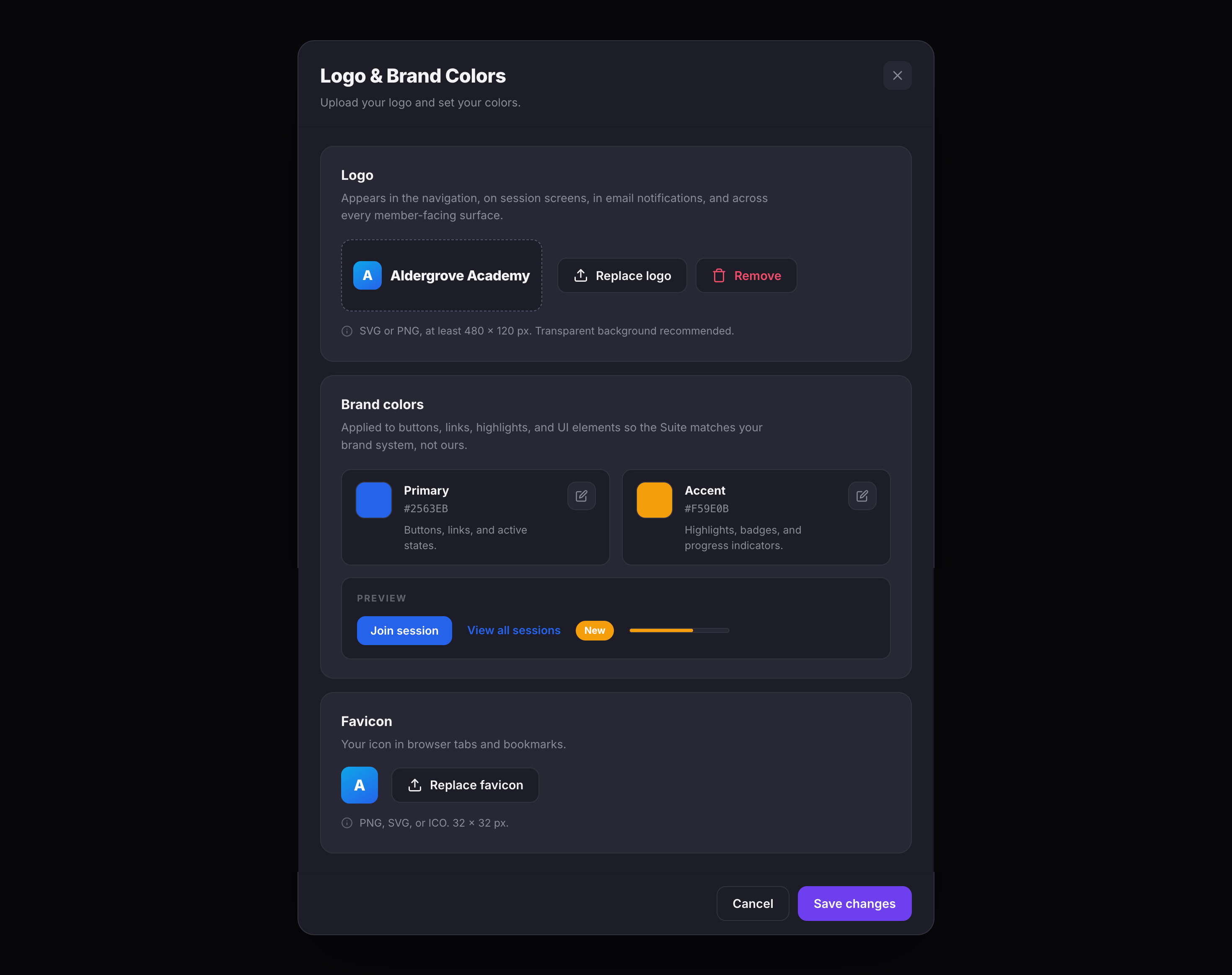
Your logo appears in the navigation, on session screens, in email notifications, and across every member-facing surface. Set your primary and accent colors so buttons, links, highlights, and UI elements match your brand system — not ours.

  • Logo upload — SVG or PNG with a transparent background, shown in the nav and across every branded surface.
  • Brand colors — set a primary and accent color for buttons, links, badges, and progress indicators, with a live preview.
  • Favicon — a 32x32 PNG, SVG, or ICO for browser tabs and bookmarks.
The Logo and Brand Colors settings showing an uploaded logo with Replace and Remove actions, Primary and Accent color swatches with hex values and a live preview, and a Favicon upload
Logo & Brand Colors — logo, primary and accent colors with live preview, and favicon
Languages & Arabic/RTL

Deploy in the language your audience speaks.

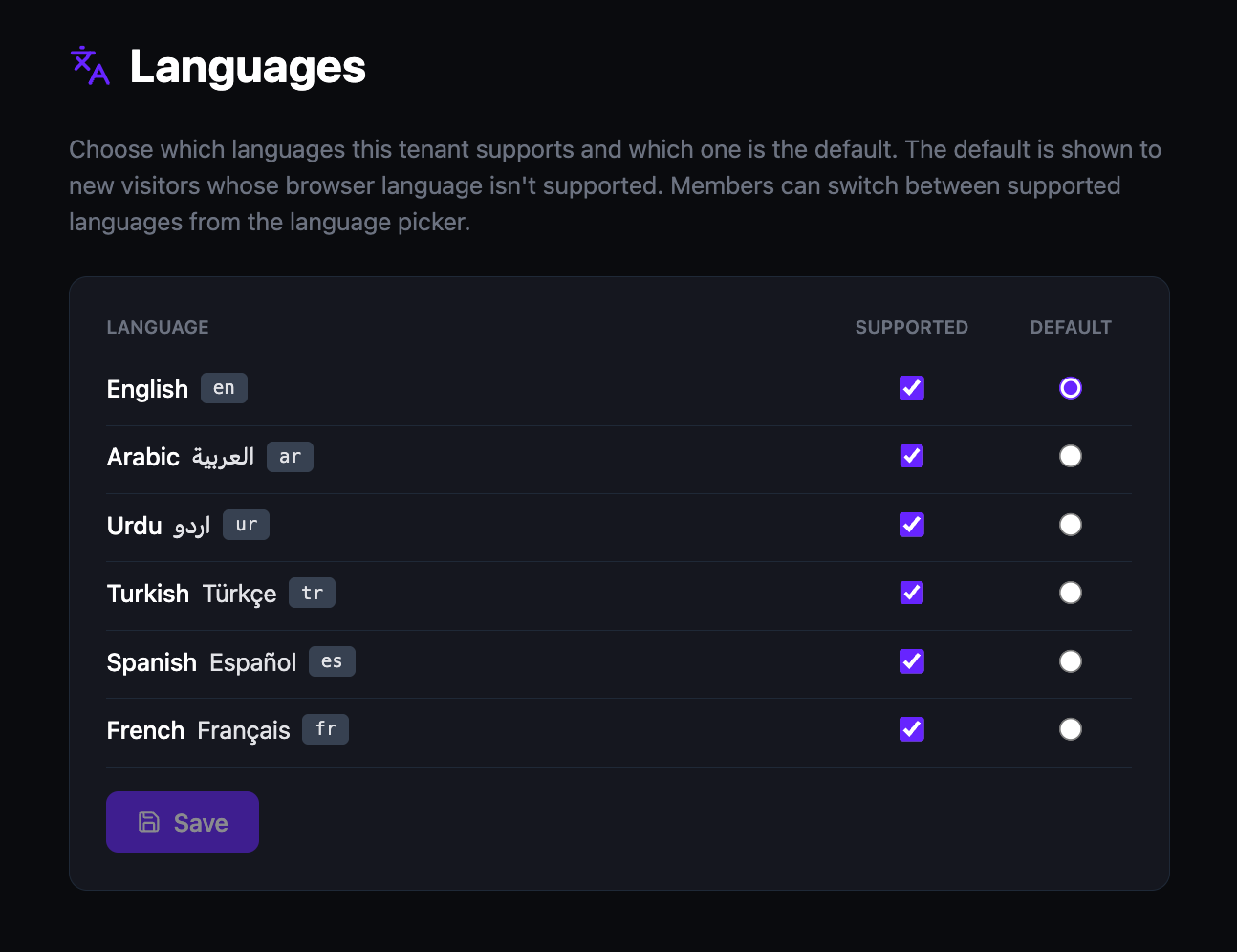
Enable any combination of 6 languages — English, Arabic, Urdu, Turkish, Spanish, and French — and set a default for new visitors. Arabic and Urdu include full right-to-left layout support built into the platform, not added as a plugin. Members switch languages from a picker at any time.

  • 6 languages — English, Arabic, Urdu, Turkish, Spanish, and French.
  • Full RTL support — Arabic and Urdu render with native right-to-left layout across the entire platform.
  • Default language — set which language new visitors see when their browser language is not in your supported list.
  • Member language picker — members switch languages anytime from the platform interface.
The Languages admin page showing a table of six languages — English, Arabic, Urdu, Turkish, Spanish, and French — with Supported checkboxes all enabled and the Default radio button selected on English
The Languages page — 6 languages with support toggles and default selection
Social Links

Connect your social presence to your platform.

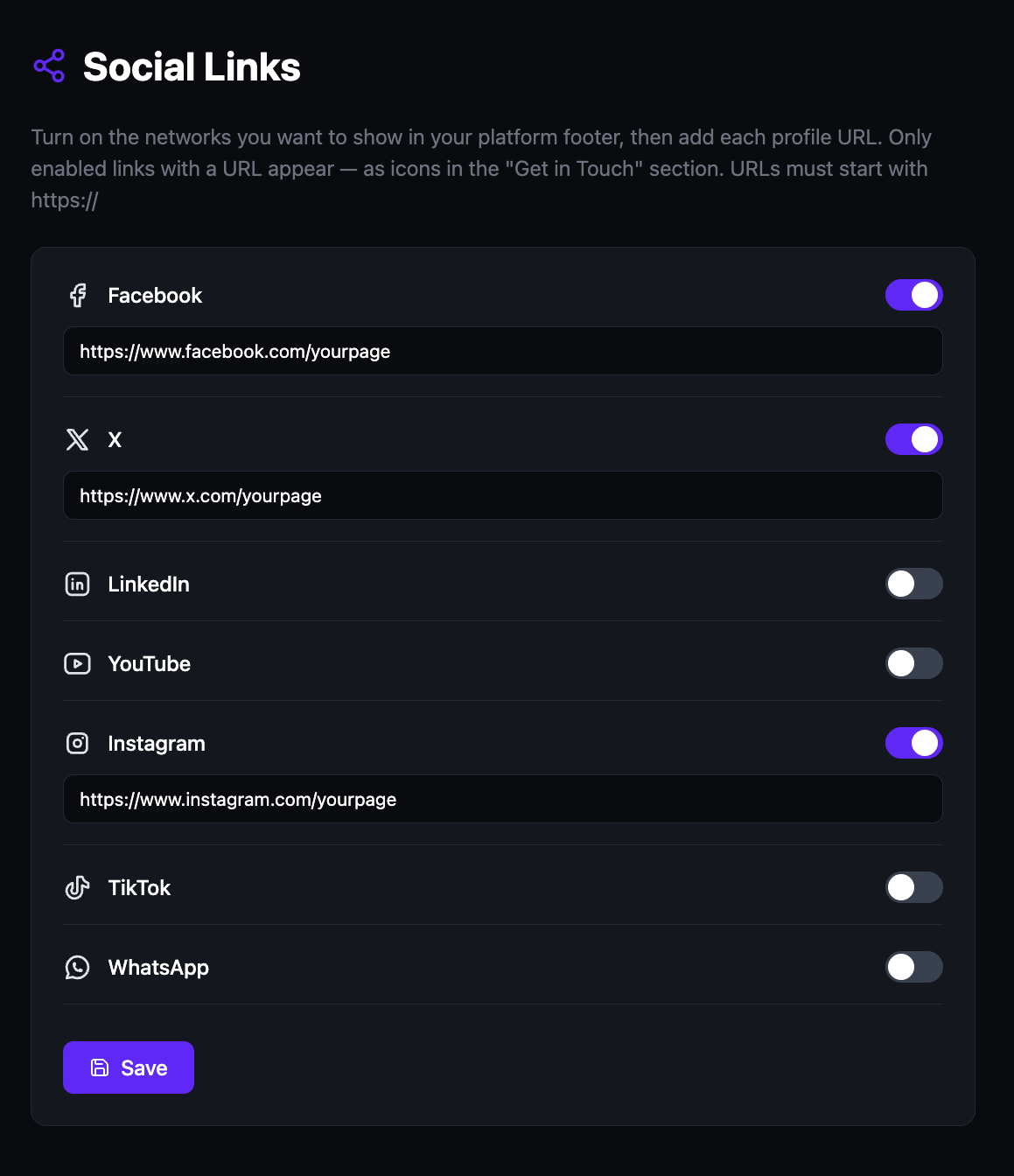
Add your organization's social media profiles and they appear as icons in the platform footer. Toggle on the networks you use, paste each URL, and your audience sees a professional "Get in Touch" section — all pointing to your channels, not ours.

  • 7 networks — Facebook, X, LinkedIn, YouTube, Instagram, TikTok, and WhatsApp.
  • Toggle controls — enable only the networks you use. Disabled networks are hidden from the footer.
  • Https URLs only — each link must start with https://, and only enabled networks with a URL show in the "Get in Touch" footer.
The Social Links admin panel with Facebook, X, and Instagram toggled on and profile URLs entered, and LinkedIn, YouTube, TikTok, and WhatsApp toggled off
Social Links — toggle networks on, paste your profile URLs
Professional Profiles

Every member has a visible professional identity.

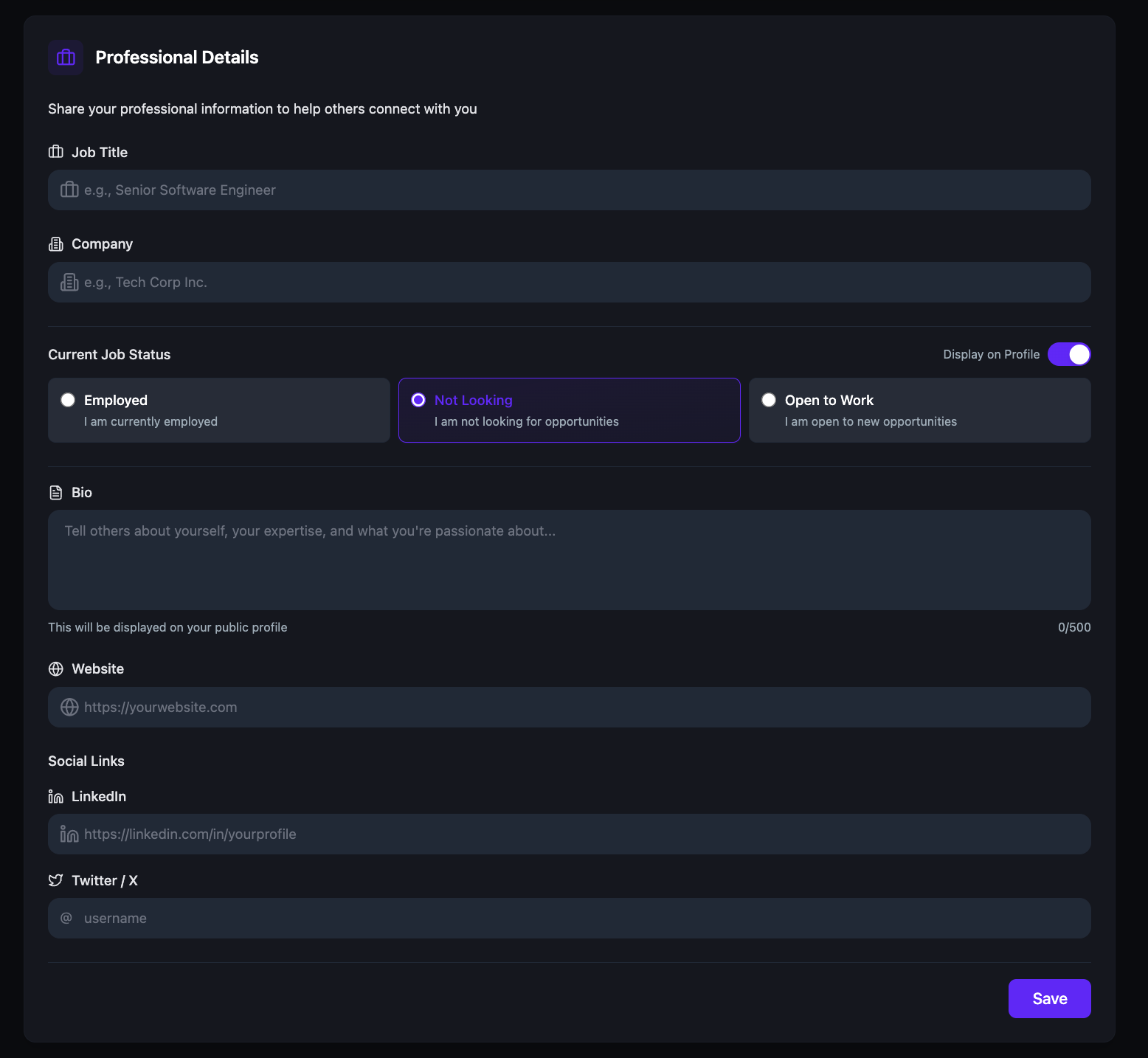
Members build out their own profile — job title, company, job status, a bio, website, and social links. It becomes their identity across the platform, visible in sessions, communities, networking rounds, and the member directory.

  • Professional details — job title, company, bio, website, LinkedIn, and X handle.
  • Job status — Employed, Not Looking, or Open to Work — with a toggle to show or hide it on their profile.
  • Cross-platform visibility — the same profile appears in sessions, communities, networking, and the directory.
The Professional Details section showing Job Title, Company, a Current Job Status choice of Employed, Not Looking, or Open to Work with a Display on Profile toggle, a Bio field, Website, and social links for LinkedIn and Twitter/X
Professional Details — job title, company, job status, bio, and social links